2007
05.31
05.31
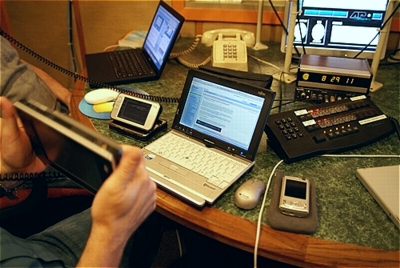
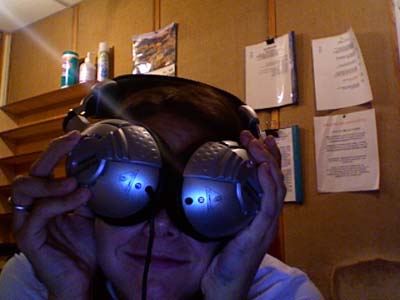
Random photo of phliKtid in the studio

We RTFM so you don’t have to | 8-10 p.m. Wednesdays, 90.1FM KPFT in Houston

The May 30th show featured special guest James Kendrick of JK On The Run. He was kind enough to sit on on the show and field some questions about mobile computing devices.
He even brought a passel of nifty gadgets!
How many times have you wanted a picture of yourself or a picture of yourself with a friend or even a group of friends? What do you do? Risk theft by handing your expensive digital camera to a stranger to take the shot or setting it down nearby?
Many of us have discovered how to hold a camera at arms length and snap the shot, but these pictures tend to be poorly composed and not very satisfactory.
Enter the Xshot

This nifty little device allows you to attach your compact digital camera and then hold it out and away from yourself, up to 37 inches (94 cm) away! And it retracts down to a small enough size to fit in your pocket, making this device very easy to bring along on any outing.
The Xshot is the perfect accessory for a night on the town or travelling on vacation!
Here’s a picture I took of myself just holding out the camera:

And here is the same picture using the Xshot

As you can see, there’s much more in the picture. This means better travel photos when you want the ultimate self portrait.
Compare after cropping:

By moving the camera away you also get less harshness caused by the flash going off so close to the subject. So when you crop the picture you get a better result. And it’s the perfect tool for the flattering angle shots used on social networking sites like Facebook and Myspace.
Learn more about this device at xshotpix.com
We’ve got two special treats for you on this week’s Technology Bytes episode .
.
Treat No. 1: The fundraiser’s over! Yay!
Treat No. 2: James Kendrick, who runs the popular jkOnTheRun gadget blog and jkOnThePhone, a cell-phone blog on our own chron.Commons, will be our in-studio guest.
James lives in Houston, and he recently brought some of his wond’rous gadgets to a Geek Gathering. We’ve asked him to bring along more goodies — listen in to hear us ooh and aahh!
And, of course, if you’ve got questions about mobile devices — PDAs, cell phones, digital media players, notebook computers, etc. — this would be the night to ask ’em!
Tune in from 8-10 p.m. Wednesday on KPFT, 90.1 FM, or listen online at KPFT.org.
An FYI for our podcast listeners:
We don’t tend to post podcasts of the show while we are in fundraiser.
This is because these episodes tend to be mostly dedicated to encouraging our local listeners to donate money to the publicly funded radio station (KPFT).
If you really want to hear our “beg-a-thon” you can collect these episodes from archive.kpft.org
We’ll resume posting here at geekradio.com after the fundraiser is over.
Look for a new podcast episode on or after May 30th.
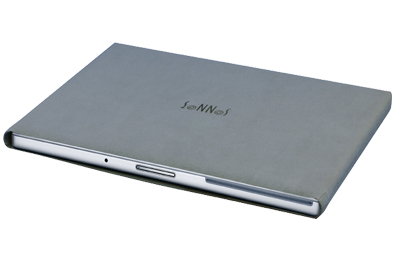
When I was in The Netherlands a few months ago, I outfitted my 17″ MacBook Pro with a MarWare Protection Pack that consisted of a keyboard cover and a hand rest that adheres to the rather large piece of real estate surrounding the touchpad. While this does wonders to protect my screen from keyboard cuts, the outer shell of my MacBook was still vulnerable to scratches and scrapes.
A few weeks later, Jay Lee threw a box my way with the understanding that I would write a review of its contents. That was the better part of two months ago. Luckily for the folks at Sonnet Technologies, I took my time. The product in question is their newest edition to the MacBook protection line, the 2fit Laptop Sleeve.
The first time I tried to insert my MacBook into the sleeve, it was a *very* tight fit. Given the heft of the 17″ MacBook Pro, I needed some aid from the top of my desk. This left me wondering if the 2fit would do harm than good to the corners of My Precious. The trouble inserting the the MacBook was eclipsed only by the difficulty of getting it back out.
Given my track record with hardware, I knew that it was only a matter of weeks before I earthed the laptop while taking it out of the sleeve. The risk/reward ratio on this product was just too high… I was about to call it quits when I noticed that the grey microfiber fabric went smashingly well with a new courrier bag I had picked up in London on the last leg of my trip to The Hague. The sacrifices we make for style…
Now that I’ve spent some time with the sleeve, it has loosened up considerably. Instead of trying to pull it free of the 2fit’s protective clutches, I now have enough wiggle room to pull the sleeve back onto itself, allowing the MacBook to emerge from its protective cocoon in much the same way a banana emerges from it’s skin. Without the rips in the fabric, of course… The fabric seems to be very durable and somewhat stretchier than I had first thought.
I failed to mention that a screen protector was also in the box, nearly identical to the Marware protector that I was already using (there’s only so much you can do with a fitted keyboard cover that doubles as a microfiber screen cleaner). After having cut the screen of my 15″ TiBook, I was already sold on this product. If you’re not already using something to protect the screen of your Apple laptop, it’s only a matter of time before you can start to see the outline of keys biting into your screen. Don’t make the same mistakes I did…
While I have yet to soil the Sonnet 2fit sleeve, their site does claim that it is machine washable. I’ll amend this review once I toss it into the wash, perhaps including a video of the safer way to holster and remove your weapon of choice.
Here at Technology Bytes one of the more common questions that we keep getting, both on the phone and in our e-mail, concerns transferring data from one computer to another. The scenario is usually along the lines of needing to move files from an old computer to a new one.
Certainly, if your somewhat computer savvy and have a home network you can configure things so that you can move files back and forth, but it’s a rather involved process and takes some time, effort and knowledge to setup.
What if there was an easier, simpler way?
Enter The Tornado™!
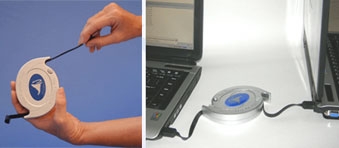
A simple and elegant device, The Tornado is a USB to USB connector. Plug one end into the USB port of one computer and plug the other end into the USB of the other computer. Without having to install anything, a program window will pop up on both computers which gives you an easy to use, File Manager/Windows Explorer style interface that will let you easily and quickly transfer files between the two PC’s by simply dragging them and dropping them into the appropriate folder of either computer.
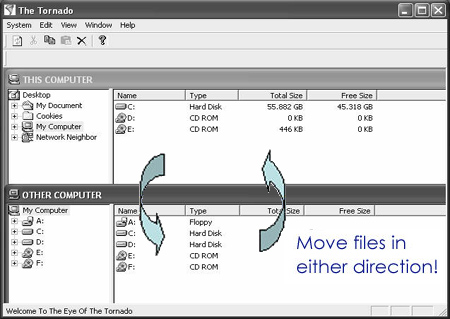
The Tornado has a 25MB/s transfer rate and is compatible with Windows 98SE*, ME, 2000, XP, and Vista.
Sorry, no Mac support.
* Windows 98SE operating system does not support the auto loading of drivers. To load the necessary 98 driver, click here or come back after you purchase your device and download the driver for free.
The Houston ITEC show is happening next week at Reliant Park. On May 16th
and 17th, Houston’s biggest technology expo comes to town, this year
foucsing it’s sights on small and midsize businesses. This year’s show is
actually made of six seperate conferences with 24 sessions covering
technical topics such as networking, wireless technology, security and mobility
along side more ordinary topics like podcast production, blogging for
business and IT infrastructure.
Head over to www.goitec.com for details and registration.
That’s it for this week, but two reminders for the weeks to come.
First, the Houston Linux Users Group will be holding a Data Backup Seminar
at the HAL-PC Saturday, May 26th from 2:00 to 4:00 in the afternoon.
www.hlg.org for more info. And secondly, our own Dwight Silverman will be
talking at the Houston Area Apple Users Group, aka Haag, Saturday May
19th. The event goes from nine am to two pm, though I suspect Dwight will
only be speaking “oficially” at the eleven o’clock hour.
This will be taking place at the Rice University Media
Center. Hit www.haaug.org for more info.
That’s it for your technology fun raiser and that’s that for BarretTime.
Ann hams it up with the crew of Technology Bytes

Behold phliKtid’s might lemon!