2008
07.24
07.24
This show had an inordinate number of people calling in with issues relating to external hard drives…
We RTFM so you don’t have to | 8-10 p.m. Wednesdays, 90.1FM KPFT in Houston
This show had an inordinate number of people calling in with issues relating to external hard drives…
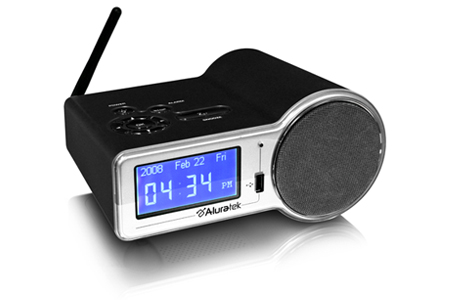
I hooked up one of the new Aluratek Internet Radio Alarm Clocks with Built-in WiFi last week and have been reaping the benefits ever since!
This device connects up to your home network via built in wireless and has the ability to access over 11,000 radio stations worldwide via built-in vTuner and best of all, they’re free!
The device is amazingly simple to configure and comes with it’s own remote control. The menus are also very well laid out for easy access to the stations by genre or geographical location.
While it is marketed as a clock radio, it also has the ability to connect to your home stereo and act as a media server. That means you can use it to connect back to your Windows Media Player or iTunes library to stream your own digital music. You can even connect it to your USB storage device and have it serve as your MP3 player.
You can learn more about this device at aluratek.com
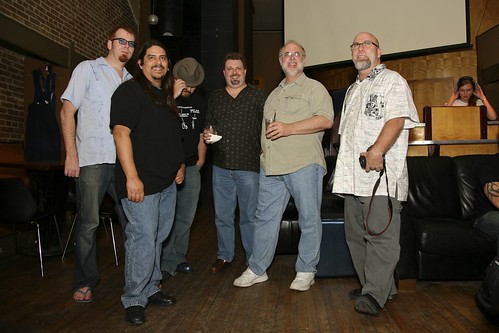
From left to right, Barrett, Groovehouse, phliKtid, Peter, Dwight, Jay Lee and The Cylon Girlfriend
Photo courtesy of Ed Schipul
Reinstalling Windows was the dominant theme.
That and our upcoming 13th anniversary party.
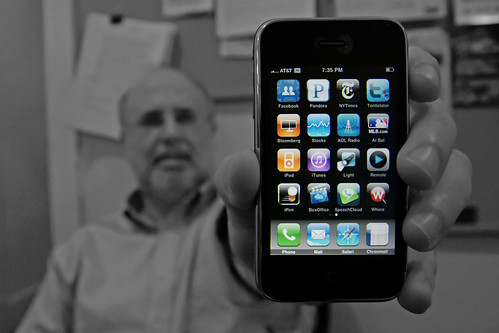
Photo by Jay Lee
Dwight Silverman proudly shows us his iPhone. I chose to let the iPhone remain in color while desaturating the rest. I find the contrast between the shiny new technology and the not so shiny new tech geek rather compelling.
Nothing personal, Dwight!
Dwight returns. The crew gets it’s “funny” back.
Can you believe it? Technology Bytes has been on the air for an amazing 13 years! Come celebrate with us at Dean’s Credit Clothing on Saturday July 19th from 7:30 till ?
Dean’s is a very cool space located at 316 Main St in Houston, TX and features a full bar and a great atmosphere. DJ Amanda Robinson will be laying down the tracks as our DJ for the evening. We’re inviting all listeners of Technology Bytes to join us and we hope to see you there.
Please spread the word!

It wasn’t too long ago that if you wanted to run a piece of Open Source software, you have to have an open source operating system to go along with it. As a large number of Open Source projects have been ported over to the Microsoft Windows Operating System, this is no longer true… Now all you need is a connection to the internet to the best of what Open Source has to offer in the Windows world.
Perhaps the most widely known open source project outside of the Linux world is Mozilla Firefox, the free web browser, now in version 3.0. www.firefox.com is the address you want to hit to grab a copy today. For those of you using Microsoft Internet Explorer, this would be an alternate choice for web browsers. The coolest thing about Firefox 3 is the awesome bar. Having been using this for a week or so now, I’m not sure if I could go back to typing in the full URL.
Mozilla isn’t just pushing out products for web browsing… With Mozilla Thunderbird, you have a powerful email client, complete with SPAM filtering and a solid interface that is easy to pick up if you’re coming over from Microsoft Outlook or Outlook Express.
If you’re looking to make some legal copies of DVDs or CDs, you might want to check out MediaCoder. MediaCoder is a free universal batch media transcoder, which integrates most popular audio and video codecs into an all-in-one solution. If you’ve ever struggled with finding the right codec to rip or play a video, this could be your audio/video swiss army knife.
And if you’re not happy with only ripping audio, but walso ant to try your hand at cutting up tracks or even remixing things, you’ll want to check out Audacity. You can record live audio, convert tapes and records into digital formats, edit ogg vorbis, mp3, wav and aiff sound files, cut, copy, splice and mix sounds together and a ton more.
On the office side of things, you have the aptly named Open Office.Org, the full featured suite of tools for wordprocessing, presentations and spreadsheets. Many of the applications look and feel like their Microsoft Office counterparts, with the added bonus of being able to read and save nearly every office document format known to modern man.
And the last open source application I’ll mention tonight? The Gimp. No, not a large leatherbound servant, but rather a large opensource photo editing package. If you’re familiar with PhotoShop, the Gimp, which stands for the GNU image manipulation program. Much like the plugin market for Photoshop, the gimp also has a number of feature-exanding plugins as well as something called script-fu. Script-fu gives users a way to load scripts into the gimp that will then be accible via the gui interface. These scripts can do anything from removing red-eye to taking normal text and adding effects for the web. Since anyone can write a script, they’re really only limited by the imagination of your fellow gimp-users.
As I said, all of these programs are free and available for Windows. Most of them are also available for OS Ten, though you will have to have an X11 environment installed for things like OpenOffice.org. To get links to all of the windows versions of these, hit www.opensourcewindows.org. In addition to the programs I mentioned, check out the links for handbrake, juice, mplayer, and xchat-2, an irc client. Its also important to note that even though I may say that Firefox is a Microsoft Internet Explorer replacement, I don’t mean that you have to uninstall one to run the other. Every program I mentioned tonight will co-exist peacefully with their non-free counterparts.
So, Once you get your feet wet in the open souce world with free programs on a non-free operating system, you may be ready to take the next step and check out a free operating system such as Linux. While there are a ton of bootable CDs out there that will let you try out linux risk free, you may still need a little bit of hand holding. If this is the case, there are a couple of avenues open to you. If you’ve already got a touch of linux experience, you may want to hit the Houston Linux Users Group meeting that happens this Saturday from two to four in the afternoon. HLUG, as it is called, meets at the HAL-PC Headquarters near San Felipe and 610. You can hit www.hlug.org or www.hal-pc.org for driving directions. While these presentations generally have content for linux newbies and greybeards alike, they do assume a certain familiarity with the OS.
If you’re a complete noob to linux, you might want to hit up Linux 101 this Tuesday at seven PM at the same location. Linux 101 is put on by the Houston Linux Users Group the first Tuesday of every month at seven PM and is designed to give you a good firm grasp on the obvious. Both the hlug.org and hal-pc.org sites have information on Linux 101.
And, as Jay said, things are looking good for the TechBytes Anniversary party in July at Dean’s credit clothing. This party will take place the second Saturday of July, and will replace the regular first friday geek gathering that would have happened on the 6th. Keep checking the techbytes website for the info; we’ll have it out there as soon as it is finalized.
That’s that for your free software four one one and that’s that for BarretTime.
(Hyperlinked version to follow!)
You guys helped me! — Technology Bytes contact form
Hey — just wanted to say thanks! I called in last night about a computer
that suffered a killer power surge and I was trying to get the info off of
the hdd by making it a slave. I bought one of those USB enclosures and it
worked! I got everything I needed. You saved me several thousand dollars
and weeks of redoing all that work!
You guys are awesome!